Gozi Gozi Gozi - String Decryption
A Zero2Automated challenge on GOZI ! Reverse the string decryption routine and develop a script !
Description of the Z2A challenge
This challenge involves the ISFB malware family!
- Reverse engineer the string decryption routine
- Develop a script to automate decryption
| SHA256 | 0a66e8376fc6d9283e500c6e774dc0a109656fd457a0ce7dbf40419bc8d50936 |
|---|---|
| Malware Bazaar link | https://bazaar.abuse.ch/sample/0a66e8376fc6d9283e500c6e774dc0a109656fd457a0ce7dbf40419bc8d50936/ |
| File Type | DLL |
Basic Static Analysis
Using Detect It Easy, two sections of the provided file show some irregularities. The .crt section reaches a high entropy value of 7.98 & .erloc also reaches 7.98. Moreover, the diagram shows a constant flat area on both functions with no spikes. This indicates two encrypted sections and the presence of a packer.
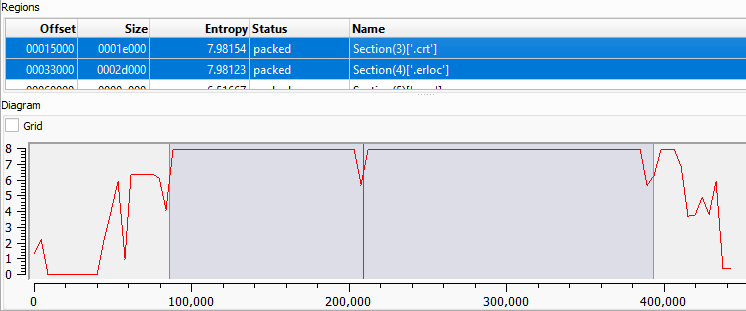 Detect It Easy - Two packed section
Unpacking
In x32dbg, it is necessary to breakpoints on the VirtualAlloc & VirtualProtect WinAPI functions. After three hits, a valid MZ* binary appears in the dump view.
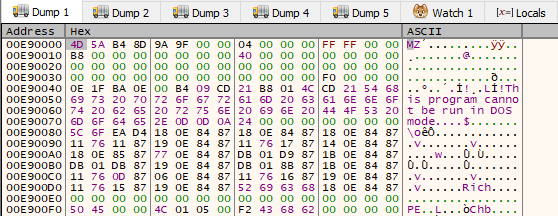 x32dbg in the dump view of the returned value after VirtualAlloc
This binary is mapped, as confirmed by the hex view of the dump. Even if the sample is successfully dumped, it cannot be analyzed correctly at this stage.
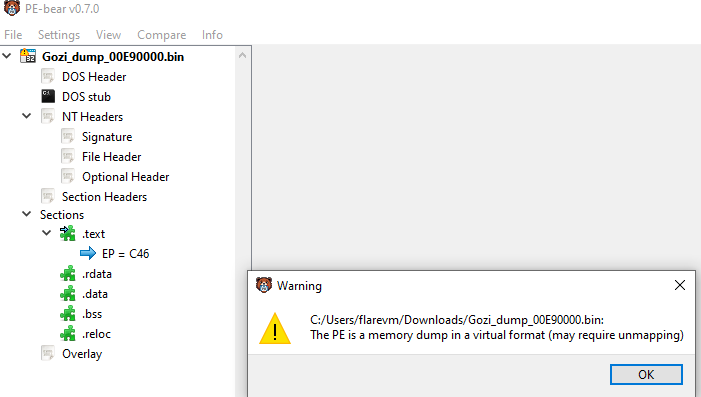 PE-Bear Warning message
Unmapping PE file
For proper analysis, this dumped binary needs to be converted to an unmapped binary using a PE tool such as PE-Bear.
First, open the dumped file in PE-Bear and click on Section Hdrs tab.
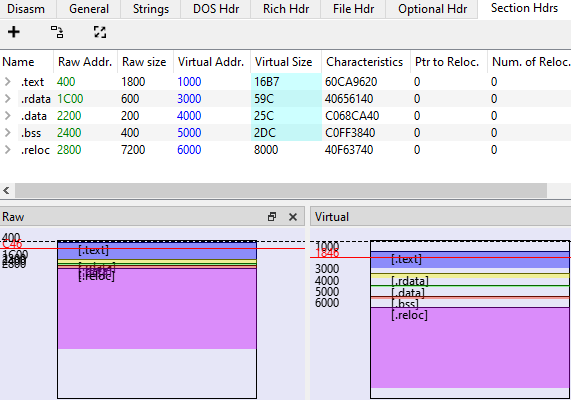 _PE-Bear - Section view 1 _
Second, edit the Raw Addr. field to match the Virtual Addr.
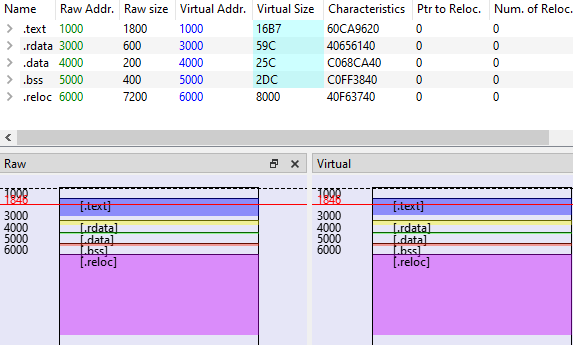 PE-Bear - Section view 2
Third, use the this formula to edit the Raw size : Raw size n = VA of n+1 - VA of n. Finally, set the Virtual Size to match the Raw size.
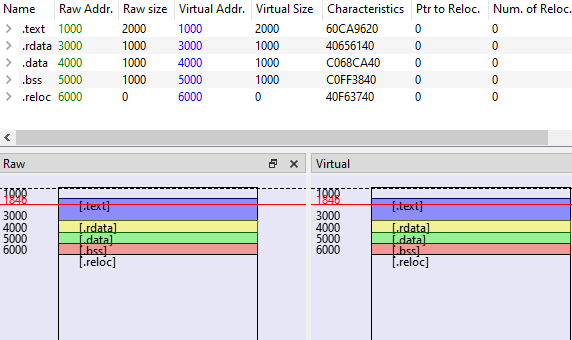 PE-Bear - Section view 3
After editing the Section Hdrs tab, go to the Optional Hdr tab and verify the Image Base value. It must match the packed malware’s image base. You can then save the Gozi dump file to disk. To confirm that the modifications are applied successfully, inspect the different libraries listed in the Imports tab and launch IDA !
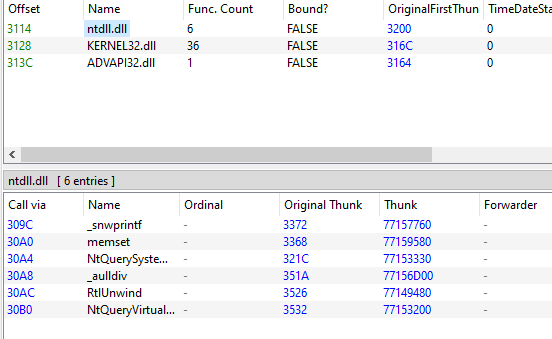 PE-Bear - Imports Tab
Here is a comparaison between two screenshot on IDA (before & after unmapping the PE file)
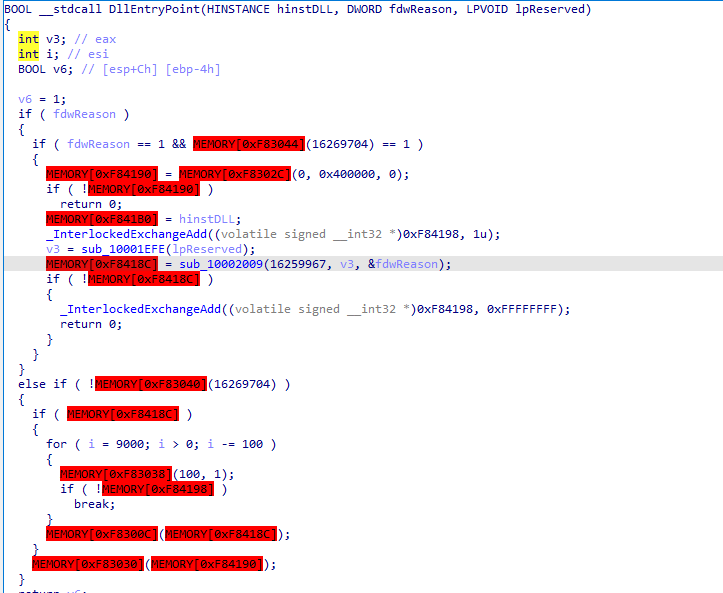 IDA Before Unmapping
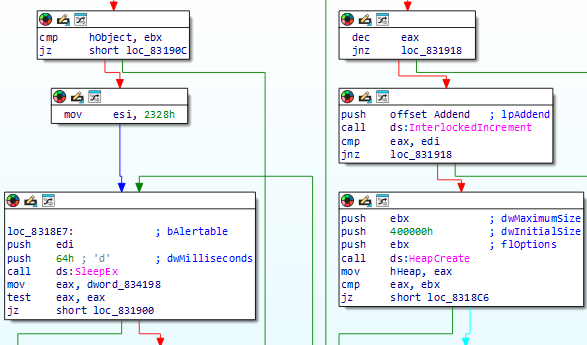 IDA After Unmapping
Static Analysis
This first function called sub_831EFE checks the MZ signature at the beginning of the file, after, a handle to the DLL is retrieved. This handle will be used in the next function which involves APC Injection. This method uses 2 interesting parameters :
- A function (analyzed in The APC function part)
- A handle to the dll
1
2
3
possible_dll = retrieve_dll_handle(lpReserved);
hObject = APC_injection((PAPCFUNC)sub_831B7F, (ULONG_PTR)possible_dll, &fdwReason);
APC Injection
This technique allows a program to execute code in a specific thread by attaching to an APC queue. The injected code will be executed by the thread when it exists of alertable state like
SleepEx,SignalObjectAndWaitorWaitForSingleObjectsEx.
This APC_injection function creates a new thread with the starting routine SleepEx to trigger the APC queue. Then, the API QueueUserAPC is run with 3 parameters:
pfnAPC- The next function to be analyzedThread- The thread handledwData- Unique value transmitted, here the DLL handle
1
2
3
4
5
6
7
8
9
10
11
12
Thread = CreateThread(0, 0, (LPTHREAD_START_ROUTINE)SleepEx, lpParameter, 0, lpThreadId);

v4 = Thread;
if ( Thread && !QueueUserAPC(pfnAPC, Thread, dwData) )
  {
    LastError = GetLastError();
    TerminateThread(v4, LastError);
    CloseHandle(v4);
    v4 = 0;
    SetLastError(LastError);
  }
return v4;
The APC function
Let’s dive into the APC function, used as a parameter of QueueUserAPC above ! The thread is retrieved and pinned to the CPU 0 with SetThreadAffinityMask. After, the thread priority is set to -1 (THREAD_PRIORITY_BELOW_NORMAL).
1
2
3
4
 CurrentThread = GetCurrentThread();
  if ( SetThreadAffinityMask(CurrentThread, 1u) )
    SetThreadPriority(CurrentThread, THREAD_PRIORITY_BELOW_NORMAL);
  v2 = query_info(Parameter);
The method query_info is the “main” of our APC function. It begins with a check function that verifies the Windows OS version. This program refuses to run on Windows <= XP/2003.
1
2
if (MajorVersion == 5 && MinorVersion == 0)
/* ... */
Then, a handle to the current process is collected with several access rights described in the code below.
1
2
3
4
5
6
7
8
9
10
11
current_pid = GetCurrentProcessId();
process_handle = (int)OpenProcess(0x10047Au, 0, current_pid);
/*
0x10047A =
PROCESS_QUERY_INFORMATION |
PROCESS_VM_READ |
PROCESS_VM_WRITE |
PROCESS_VM_OPERATION |
PROCESS_DUP_HANDLE |
PROCESS_SET_INFORMATION
*/
The following code creates a pseudo-random/magic value using the NtQuerySystemInformation API with SystemProcessorPerformanceInformation class. This parameter returns an array of SYSTEM_PROCESSOR_PERFORMANCE_INFORMATION structures, one for each processor installed in the system. Furthermore, the IdleTime value (first field of the structure) is then used modulo Ox13(19) to compute this value (unk_value). As a result, unk_value is a number between 0 & 20 (because NT_STATUS is equal to 0 if the API works fine).
1
2
3
4
5
6
7
8
9
10
11
12
13
14
15
16
17
18
19
20
21
22
23
24
25
result = w_open_process();
  handle_selfProcess = (DWORD)result;
  if ( !result )
  {
    do
    {
      unk_arg = 0;
      ReturnLength = 0;
      SystemInformationLength = 48;
      do
      {
        SystemInformation = (_SYSTEM_PROCESSOR_PERFORMANCE_INFORMATION *)w_heap_alloc(SystemInformationLength);
        if ( SystemInformation )
        {
          ret_NtQuerySysInf = NtQuerySystemInformation(
                                SystemProcessorPerformanceInformation,
                                SystemInformation,
                                SystemInformationLength,
                                &ReturnLength);
          handle_selfProcess = (unsigned __int16)ret_NtQuerySysInf;
          if ( (unsigned __int16)ret_NtQuerySysInf == 4 )
            SystemInformationLength += 48;
          unk_value = SystemInformation->IdleTime.LowPart % 0x13 + ret_NtQuerySysInf + 1;
          w_heap_free(SystemInformation);
          /* ... */*
This value is then used later in sub_83197C. The function sub_831922 checks the presence of the .bss section. Iterating through all the sections in the binary using section->Name == 'ssb.'.
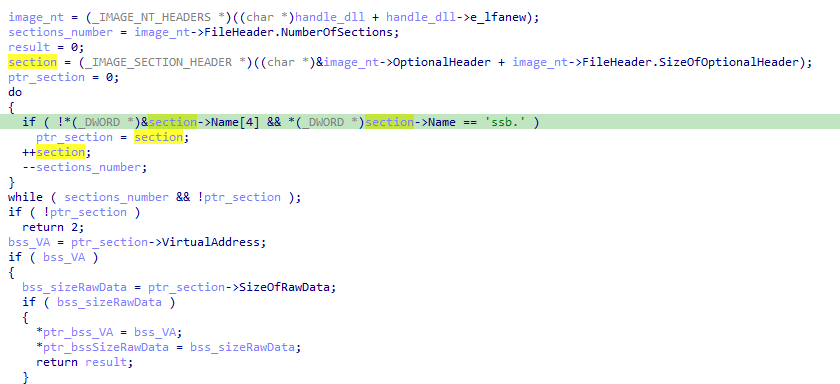 IDA - Iteration to find .bss section
Finally, this function stores the Virtual Address and Size Raw Data of the section.
Once the malware get these values, it converts the size of the .bss section to a number of memory pages using the following formula :
1
pages = (bss_sizeRawData >> 12) + ((bss_sizeRawData & 0xFFF) != 0);
X >> 12=X / 4096= npX & 0xFFF=X % 4096=nb != 0 -> pn++np (number pages) - nb (number bytes) So ifX = 6500->np = 2—-> 2 memory pages needed to hold 6500 bytes
Using the number of pages, it allocates a memory area using VirtualAlloc:
1
2
3
4
5
6
v5 = VirtualAlloc(
	0,
	pages << 12, // pn * 4096 = bytes
	MEM_COMMIT | MEM_RESERVE, //0x3000
	PAGE_READWRITE // 0x4
);
Then, the decrypt function is called, using the pseudo-code shows a lot of information that can mislead the analyst. The code below displays the string used by the malware : “Apr 26 2022”, surely the campaign date of gozi.
1
2
3
4
5
6
strcpy((char *)weird_str, "26 2022");
decrypt(
	(_DWORD *)((char *)cpy_bss_offset + delta),
	(int)cpy_bss_offset,
	bss_VA + first_dword_date[0] + *(_DWORD *)second_dword_date - counter + unk_value - 1,
	1024);
To put it in a nutshell, the decrypt function iterates block by block over the .bss section. Each block is decrypted by subtracting the key from the previous cyphertext. This key is a value that depends on the value derived from the NtQuerySystemInformation API (unk_arg).
The most important line is 16, where current_block += prev_block - key; is equivalent to plaintext = ciphertext - key + prev_ciphertext; 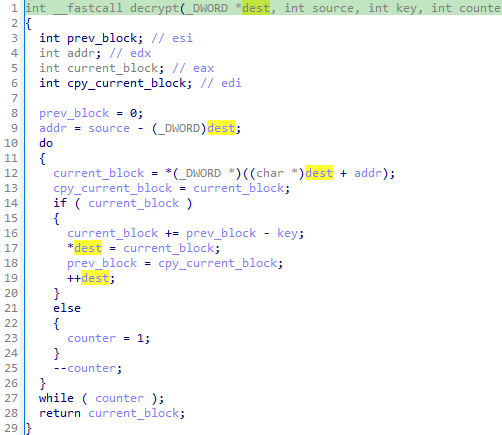
Using all the information we gather while analyzing this sample, a string decryption script can be code.
Strings Decryption Code
The behavior observed above is translated into the following Python script:
1
2
3
4
5
6
7
8
9
10
11
12
13
14
15
16
17
18
19
20
21
22
23
24
25
26
27
28
29
30
31
32
33
34
35
36
37
38
39
40
41
42
43
44
45
46
47
48
import pefile
import struct

path = "////////////"
date = b"Apr 26 2022" # Date of campaign

def get_bss_section(pe):
    for section in pe.sections:
        if b".bss" in section.Name:
            data = file[section.PointerToRawData:section.PointerToRawData+section.SizeOfRawData]
            return section.VirtualAddress, data

def retrieve_key(bss_va, date, index):
    date_first_part = struct.unpack("<I", date[0:4])[0]
    date_second_part = struct.unpack("<I", date[4:8])[0]
    return date_first_part + date_second_part + bss_va + index

def decrypt(data, key):
    ct = 0
    final = b""
    for i in range (0, len(data), 4):
        encoded = struct.unpack("I", data[i:i+4])[0]
        if encoded:

            final += struct.pack("I", (ct - key + encoded) & 0xffffffff)
            ct = encoded

        else:
            break
    return final

found = False
pe = pefile.PE(path)
file = open(path, "rb").read()
bss_va, data = get_bss_section(pe)

for i in range (0,20):
    key = retrieve_key(bss_va, date, i)
    decrypted = decrypt(data, key)
    if b"NTDLL.DLL" in decrypted:
        found = True
        break

if found:
    print(decrypted)
    print("-> Decrypted strings above !")
    print("-> Magic value : " + hex(i))
    print("-> Key : " + hex(key))
In the next article on the Gozi sample, I will continue the analysis and explore the next steps. See you next time !
R3dy —————-
“Gouzi-gouzi is a French onomatopoeic expression used in infant-directed speech to amuse babies”